Warp Stone
Five diamonds arranged as a cross create one Warp Stone. The finished item uses an amethyst shard as its visible material.
5 × DIAMOND → 1 × Warp Stone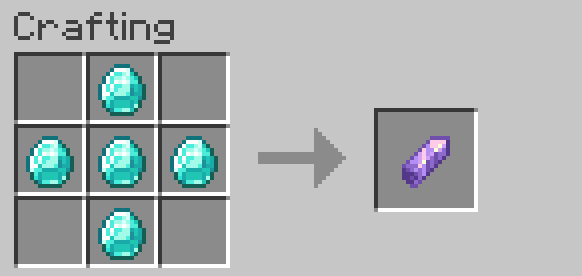
 404WarpDocumentation · 1.0b
A survival-friendly travel system built around crafted Warp Stones, a Warp Book, shared destinations, and server-managed warps.
404warp-1.0b.jar into the server's plugins/ folder.plugins/404Warp/config.yml, warps.yml, and the locale/ folder.warps.yml data and customized locale values are retained; new language keys are merged automatically.404Warp adds two shaped crafting recipes. The result items carry plugin data, so ordinary amethyst shards and books cannot act as warp items.
Five diamonds arranged as a cross create one Warp Stone. The finished item uses an amethyst shard as its visible material.
5 × DIAMOND → 1 × Warp StoneFour diamonds surround a normal book. Keep the Warp Book in your inventory and right-click it whenever you need the warp menu.
4 × DIAMOND + 1 × BOOK → 1 × Warp Book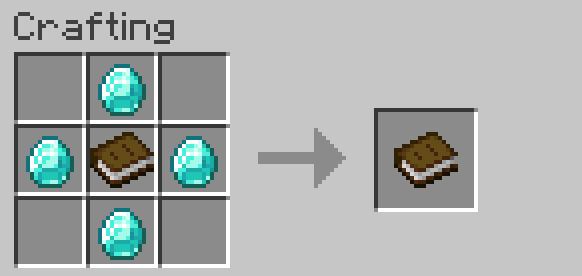
/survivalwarps give serverstone <player> [amount].Warp 1.By default each player may own up to ten warps, creation is blocked in Creative mode, and one stone is consumed. Right-clicking at or within 1.5 blocks of one of your existing warps toggles it active or inactive and consumes a stone when warps.consume_warpstone_on_toggle is enabled.
Inactive warps stay in storage. Their destination particles stop, and normal teleporting is blocked unless teleport.allow_teleport_to_inactive_warps is enabled.
Right-click the Warp Book in the main hand to open the overview. The book is a reusable menu item and is not consumed.
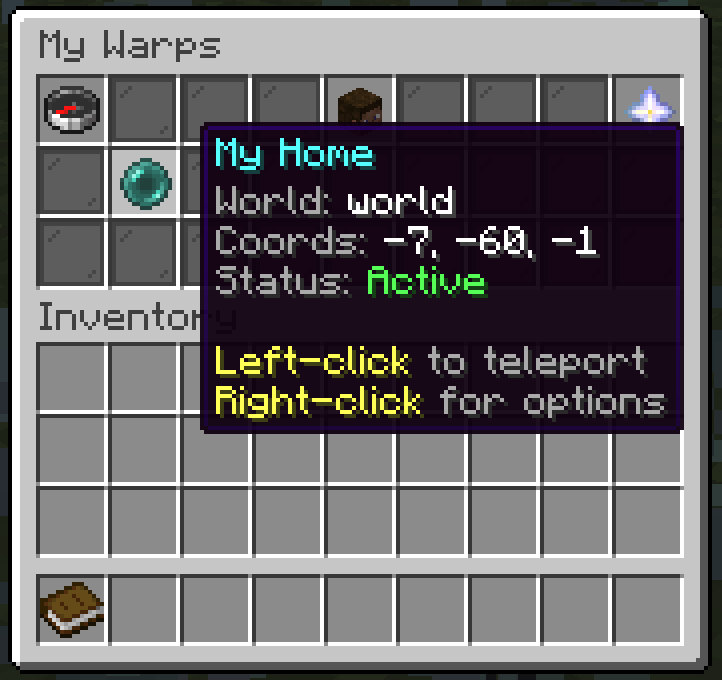
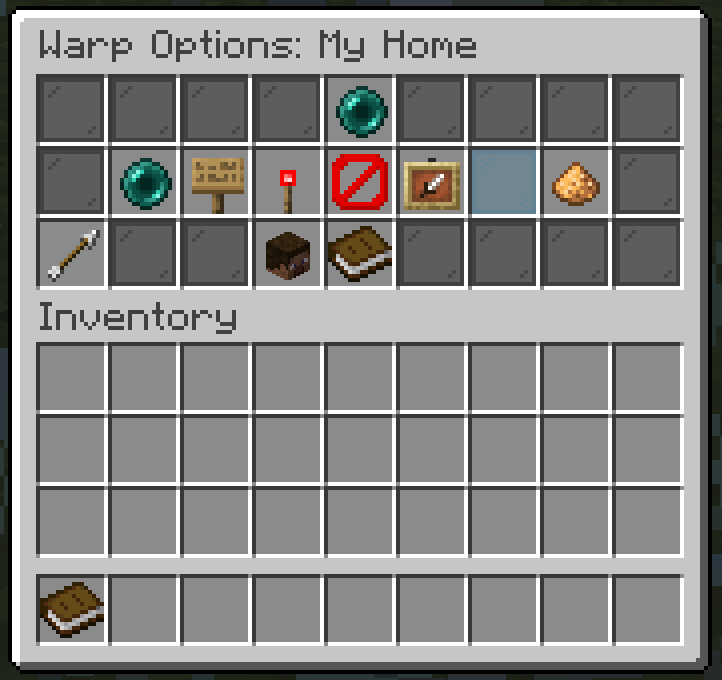
The icon picker uses the material of an item clicked in your inventory without consuming it. Ten particle colors are available: cyan, blue, purple, pink, green, yellow, orange, red, white, and gray. Disabling particles hides the destination effect without disabling the warp itself.
Owners with survivalwarps.share can choose Share Warp, enter the name of a player who has joined the server before, and then manage that player from Shared Players. A warp cannot be shared with its owner or with more players than the configured limit.
| Access | Effect |
|---|---|
| Can Use | Allows teleporting through the Shared Warps tab when the player also has survivalwarps.shared.use. |
| Contributor | Allows editing when the player has survivalwarps.shared.contribute. Rename, icon, color, and active-toggle abilities are independently controlled in sharing.*. |
| Removed | Immediately removes the warp from that player's shared list and revokes use and contributor access. |
Only the owner or a full administrator can manage the shared-player list. Contributors cannot delete the warp or change its shared users.
Server warps are global destinations stored separately from player warps. They are created by right-clicking a safe block with a Server Warp Stone, represented by a Nether Star.
/survivalwarps give serverstone <player> [amount].survivalwarps.serverwarps.create or full admin permission.Server Warp N.Set server_warps.require_permission_to_use to true when only players with the configured use permission should be able to travel to global destinations.
Player, shared, and server warps each have independent XP-cost and cooldown switches. The bypass permissions default to operators.
The aliases /404warp, /warpsystem, and /swarps invoke the same command.
| Command | Permission | Purpose |
|---|---|---|
/survivalwarps | None | Show the available command help. |
/survivalwarps reload | survivalwarps.admin | Reload configuration, locale files, warp data, and destination particles. |
/survivalwarps give stone <player> [amount] | survivalwarps.admin | Give 1–64 Warp Stones to an online player. |
/survivalwarps give book <player> [amount] | survivalwarps.admin | Give 1–64 Warp Books to an online player. |
/survivalwarps give serverstone <player> [amount] | survivalwarps.serverwarps.give or admin | Give 1–64 non-craftable Server Warp Stones. |
/survivalwarps admin | survivalwarps.admin.manage or admin | Open the player and server warp administration GUI. |
| Permission | Default | Controls |
|---|---|---|
survivalwarps.use | true | Opening the Warp Book and starting normal teleports. |
survivalwarps.create | true | Creating personal warps with a Warp Stone. |
survivalwarps.manage | true | Editing, toggling, and deleting owned warps. |
survivalwarps.share | true | Sharing owned warps and managing their access list. |
survivalwarps.shared.use | true | Using a shared warp whose Can Use flag is enabled. |
survivalwarps.shared.contribute | true | Using contributor editing rights. |
survivalwarps.serverwarps.use | true | Using server warps when permission-gated use is enabled. |
survivalwarps.serverwarps.create | op | Creating server warps. |
survivalwarps.serverwarps.manage | op | Editing and deleting server warps. |
survivalwarps.serverwarps.give | op | Giving Server Warp Stones. |
survivalwarps.teleport.bypassxp | op | Bypassing teleport XP costs. |
survivalwarps.teleport.bypasscooldown | op | Bypassing teleport cooldowns. |
survivalwarps.admin.manage | op | Opening and operating the admin GUI for player warps. |
survivalwarps.admin | op | Full administration and normal access bypass. |
| Key | Default | Effect |
|---|---|---|
lang | en_us | en_us, de_de, or custom. |
teleport.countdown_seconds | 5 | Seconds before normal travel completes. |
teleport.cancel_on_move | true | Cancel when movement exceeds the configured distance. |
teleport.move_cancel_distance | 0.15 | Allowed positional movement in blocks. |
teleport.cancel_on_damage | true | Cancel after uncancelled incoming damage. |
teleport.cancel_on_attack | true | Cancel after dealing direct or projectile damage. |
teleport.allow_teleport_to_inactive_warps | false | Permit travel to inactive destinations. |
teleport.xp_cost_enabled | false | Enable XP-level charging. |
teleport.xp_cost_levels | 1 | Levels charged after successful travel. |
teleport.xp_cost_apply_to_player_warps | true | Apply cost to owned warps. |
teleport.xp_cost_apply_to_shared_warps | true | Apply cost to shared warps. |
teleport.xp_cost_apply_to_server_warps | true | Apply cost to server warps. |
teleport.xp_cost_bypass_permission | survivalwarps.teleport.bypassxp | Permission exempt from XP cost. |
teleport.cooldown_enabled | false | Enable per-player teleport cooldowns. |
teleport.cooldown_seconds | 60 | Cooldown length; resets on server restart. |
teleport.cooldown_apply_to_player_warps | true | Apply cooldown to owned warps. |
teleport.cooldown_apply_to_shared_warps | true | Apply cooldown to shared warps. |
teleport.cooldown_apply_to_server_warps | true | Apply cooldown to server warps. |
teleport.cooldown_bypass_permission | survivalwarps.teleport.bypasscooldown | Permission exempt from cooldown. |
| Key | Default | Effect |
|---|---|---|
warps.max_warps_per_player | 10 | Maximum personal warps. |
warps.consume_warpstone_on_create | true | Consume a stone after creation. |
warps.consume_warpstone_on_toggle | true | Consume a stone when toggling at the destination. |
warps.allow_creative_create | false | Allow creation in Creative mode. |
warps.check_safe_destination | true | Validate destinations during creation and travel. |
particles.enabled | true | Master switch for destination particles. |
particles.range_blocks | 32 | Viewer distance for destination particles. |
particles.interval_ticks | 10 | Ticks between effect updates. |
particles.points_per_swirl | 12 | Particle points in each rotating ring. |
particles.swirl_height | 1.8 | Height of the destination funnel. |
particles.swirl_radius | 0.7 | Maximum funnel radius. |
particles.default_color | CYAN | Color assigned to new personal warps. |
| Key | Default | Effect |
|---|---|---|
sharing.enabled | true | Enable shared-warp access and controls. |
sharing.max_shared_players_per_warp | 10 | Maximum shared users per warp. |
sharing.allow_contributors_rename | true | Allow contributors to rename. |
sharing.allow_contributors_icon | true | Allow contributors to choose an icon. |
sharing.allow_contributors_color | true | Allow contributors to choose a color. |
sharing.allow_contributors_toggle_active | false | Allow contributors to activate or deactivate. |
server_warps.enabled | true | Enable server-warp creation, visibility, use, and particles. |
server_warps.consume_server_warpstone_on_create | true | Consume the special stone after creation. |
server_warps.default_icon | NETHER_STAR | Item icon for new server warps. |
server_warps.default_particle_color | CYAN | Color for new server warps. |
server_warps.require_permission_to_use | false | Require the configured use permission. |
server_warps.use_permission | survivalwarps.serverwarps.use | Permission checked when use is restricted. |
admin.manage_gui_enabled | true | Enable /survivalwarps admin. |
admin.manage_gui_teleport_uses_countdown | false | Use the countdown for admin-GUI teleports. |
Warps are stored in plugins/404Warp/warps.yml. Player warps are grouped by owner UUID; server warps have their own section. Each record includes its stable ID, type, owner, world, coordinates, facing, active and particle flags, icon, color, timestamps, and shared-access entries.
Older records without type or shared fields load with safe defaults. Malformed warp IDs and invalid icon materials are ignored or replaced rather than crashing the entire data load.
locale/en_us.ymlEnglish defaults, extracted and updated automatically.locale/de_de.ymlGerman defaults, extracted and updated automatically.locale/custom.ymlCreated from English when lang: custom; existing values stay intact while missing keys are added.plugins/404Warp/. The plugin saves every completed warp change immediately and saves again during shutdown.Use the exact shaped recipes shown above and verify 404Warp enabled successfully. Renamed ordinary shards or books do not contain the plugin's persistent item marker. If another plugin overrides the recipe key, check startup logs for recipe registration errors.
Check survivalwarps.create, your game mode, the per-player maximum, and whether the selected position has solid ground with two clear blocks above it. Creation is blocked in Creative by default.
Options appear only when the player has the relevant permission and relationship to that warp. Check survivalwarps.manage, share, shared.contribute, contributor flags, and the matching sharing.allow_contributors_* key.
The owner must enable Can Use, sharing must be enabled, and the receiving player needs both survivalwarps.use and survivalwarps.shared.use. The warp must also be active unless inactive travel is allowed.
With movement cancellation enabled, moving more than teleport.move_cancel_distance blocks cancels. Damage, attacking, world changes, and disconnecting can also cancel. Increase the threshold or disable only the condition you do not want.
Make sure the destination has a solid supporting block, clear feet and head spaces, and no lava, fire, cactus, magma, campfire, or sweet berry bush in the checked blocks. Repair the area or disable safety checking only if you accept the risk.
Confirm server_warps.enabled is true. When require_permission_to_use is enabled, grant the permission named in server_warps.use_permission.
Edit the files in plugins/404Warp/locale/, not the copies inside the JAR. Run /survivalwarps reload after editing. Missing keys are merged from the bundled defaults.